
Libby App
Improving the Borrow-to-Kindle Experience in Libby
2025 | UC San Diego Extension | UX Researcher | Usability Evaluation | Metrics
Summary
This project evaluated the usability of the Libby mobile app’s Borrow-to-Kindle feature, a critical function that allows users to borrow library eBooks and send them to their Kindle devices or apps. A usability study with six participants measured task success, time task, and user satisfaction. Findings revealed that while borrowing a book was intuitive, sending it to a Kindle was confusing for some users. Key recommendations included improving the visibility of the “Send to Kindle” option and providing clearer guidance during the process. These insights will help enhance user experience and reduce friction in this important user flow.
Background & Context
Libby, developed by OverDrive, is a widely used app that allows users to borrow eBooks and audiobooks from public libraries. A core feature is the ability to send borrowed eBooks for Kindle devices. Despite its importance, users have reported confusion and frustration with this task, leading to abandoned loans and support requests. Improving this flow is essential for user satisfaction and retention, especially for library users who prefer reading on Kindle.
Research Goals
• Evaluate the usability of the Borrow-to-Kindle workflow.
• Identify where users encounter friction or fail to complete the task.
• Measure key UX metrics related to the Borrow-to-Kindle experience.
• Provide actionable recommendations based on the findings.
• Assess how clearly the app communicates media formats during the book search
UX Questions
Participants: 6 participants (ages 28-70), all Kindle owners with minimal or no experience using Libby, and with varied levels of tech comfort.
Testing Setup: Moderate remote usability test conducted via Zoom.
Device: Participants used either smartphones or tablets with the Libby app installed.
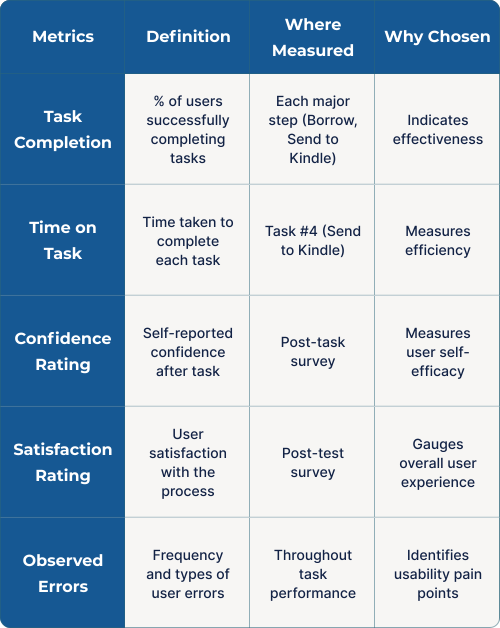
Protocol: Think aloud method during task completion. Post-task surveys including Likert-scale questions (Ease, Confidence, Satisfaction) and open-ended feedback.
Instructions: Participants were instructed not to seek help unless absolutely necessary, to simulate real-world first-time user behavior.
Tasks
Set up or log in to Libby
Search for a book of user's choice
Borrow the eBook
Send the eBook to Kindle and confirm delivery
During the book search task, 5 of 6 participants experienced confusion identifying which version of the book was compatible with Kindle. The search results presented multiple formats (Kindle eBooks, audiobooks, and other editions), but the visual distinction between these formats was not immediately clear. Several users clicked on an audiobook or non-Kindle version before realizing it was not usable for the intended task.
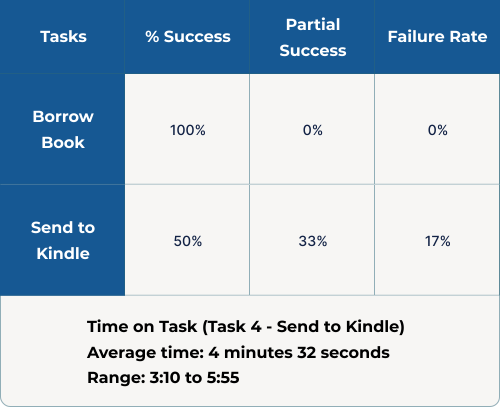
Notably, one participant successfully borrowed an eBook, but was unable to complete the "Send to Kindle" step because she had unknowingly selected an edition that was not Kindle-compatible. This illustrates how search clarity impacts not only the initial task, but also the success of downstream workflows.
Observed Behaviors
• Participants frequently scanned multiple options before finding a Kindle-compatible version.
• Some users backed out and tried a new search terms to force a different result.
• One participant borrowed an incompatible edition and was unable to send it to Kindle.
Participant Quotes
“I didn’t know which one would go to my Kindle - there were a lot of options.” - Dan, 65
“I thought the first one was the book, but it was audio.” - Erin, 34
“I couldn’t figure out why it wasn’t sending - later we realized it was the wrong version.” - Christy, 58
Survey Results (1-5 Likert Scale)
4.2
Ease of Borrowing
3.0
Ease of Sending to Kindle
3.7
Confidence
3.8
Satisfaction
User Insights
Discussion
The most significant finding from this study was that users struggled to clearly identify Kindle-compatible books during the search experience. Multiple formats (Kindle eBooks, audiobooks, and other editions) appeared with minimal differentiation, leading to extra time spent evaluating options or mistaken selections. In one case, a participant successfully borrowed a book but was unable to send it to Kindle because the version selected was not Kindle-compatible - a direct result of the unclear search interface.
In addition, the process of sending books to a Kindle was not immediately clear for new users. Only half of the participants completed the Kindle delivery task without assistance. Confusion stemmed from the inconspicuous link design and the unexpected requirement to log in to Amazon, which was not communicated early in the process.
Both findings suggest that the user experience could be significantly improved by clarifying the search interface and making the "Send to Kindle" workflow more transparent and predictable.
Key Recommendations
• Clarify Search Result Labels: Visually differentiate Kindle-compatible eBooks from other formats (audiobooks, non-Kindle editions) using clear icons, labels, or filters.
• Highlight the “Send to Kindle” Option: Replace the current link with a full-width button to improve visibility and affordance.
• Provide Immediate Feedback: Show a confirmation message after a successful Kindle delivery.
• Explain the Amazon Login Requirement: Add an onboarding tip or a send an explanation before to set user expectations.
• Optional: Offer a brief tutorial or tooltip for first-time Kindle users to guide them through the Send to Kindle process.
Limitations
• Sample Size: Small (n=6), which limits how broadly these insights can be applied.
• Participant Diversity: While participants represented a range of ages and technology comfort levels, additional diversity in device types (iOS vs Android) and library account experience could provide a more complete picture.
• Scope: The study focused on a specific workflow (Borrow-to-Kindle) and did not evaluate the overall Libby app experience or other user paths.
• Unanticipated Finding: The role of unclear search results in causing downstream task failures was identified during testing but was not part of the initial study scope. Future studies could more intentionally evaluate this factor.
• Remote Testing: As a moderated remote test, some contextual factors (such as real-world interruptions or device-specific behaviors) may not have been fully captured.
Impact & Reflection
This project reinforced the value of usability testing in revealing hidden dependencies within the user experience. While my initial focus was on improving the Borrow-to-Kindle flow, it became clear that upstream factors - specifically, how book formats are presented during search - had a significant impact on users’ ability to complete the downstream task. This insight highlights the importance of evaluating workflows holistically, not just in isolation.
The study also deepened my understanding of how small interface choices (such as clear labels and visual hierarchy) can influence user confidence, efficiency, and overall satisfaction. Moving forward, I will be more intentional about examining how interconnected UI elements support or hinder key user goals.
Future iterations could include A/B testing of revised search labeling, onboarding personalization, and improvements to the Kindle delivery flow, validated through additional usability testing with a larger and more diverse user group.